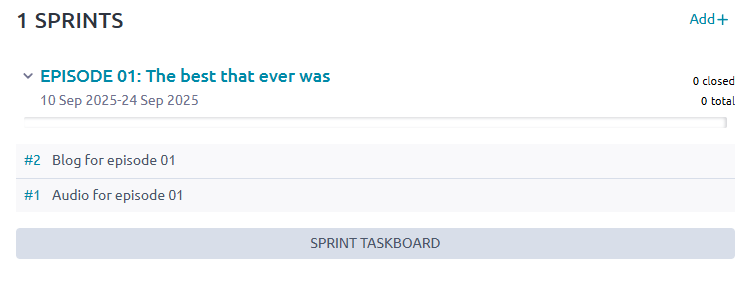
I’m looking at using Taiga to help our small team produce a podcast as a Kanban seems a good way of moving each episode through a series of steps, eg:
invite speaker
schedule interview
record interview
edit interview
publish episode
That would work easily I think, but we also need to produce the show notes and blog post that accompanies each episode:
draft show notes
approve show notes
add show notes to draft episode
draft blog post
approve blog post
publish blog post
These have dependencies with each other, but can be worked on in parallel - eg the blog post can be written while the the final editing is being done. This wouldn’t work is each episode (audio and blog post) is a user story.
But if the audio and blog posts (which must be published simultaneoulsy on different platforms) are each a separate user story, how to you tie them together?
From your requirements, it seems that actually SCRUM would be better for you!
You can have a sprint per episode, and there you can have a user story for the audio and another for the blog post. Then, in the sprint task board (which looks a bit like a Kanban), you can move each of those tasks in each of those user stories to their respective status.
Thanks, that looks great. I’ve only ever used Trello before and I need something better, but not familiar with Scrum, Agile etc, so a bit out of my depth here! Apologies for the basic questions:
what are the “cards” on the sprint board? Are they tasks?
Is it possible to set up a template? Because the process / checklist for each episode will be identical.
Is it possible to get an overview of several sprints on one screen? Because we’ll be working on several episodes at a time.
Don’t worry, that’s completely normal! We do have some tutorials more oriented to Agile and different methodologies here, if you are interested: Improve your Agile with Taiga - Taiga Community
Not in Taiga, but you could open several browser tabs side by side. Most Operating Systems and even some browsers support it out of the box, like in the attached image.
Hmm. I don’t think a sprint per episode will work for us, because we will have several episodes at different stages of production at any time, and part of the problem we are trying to fix is to get an overview of what we’re working on!
I wonder if a Kanban with swim lanes might be the answer? One swim lane for audio and one for blog. And each episode represented by two cards - one for audio and one for blog - and cards for the same episode could be the same colour. (I can’t think of any other way to link them together.)